
Migrating from 4G to 5G infrastructure doesn’t require a complete system overhaul. Your existing 4G network serves as the foundation for a strategic, phased integration that minimizes disruption while delivering measurable performance gains. The transition typically takes 6 to 18 months depending on network complexity and business requirements, with most organizations achieving operational 5G capabilities without replacing their entire infrastructure.
The key lies in understanding that 4G and 5G technologies aren’t mutually exclusive. Modern 5G systems use Non-Standalone (NSA) architecture, which leverages your current 4G core network while adding 5G radio access points. This approach cuts migration costs by 40 to 60 percent compared to standalone deployments and allows your teams to maintain familiar workflows during the transition.
Business leaders face a critical decision point right now. Your 4G infrastructure represents significant capital investment, yet competitive pressure demands the speed, capacity, and low latency that only 5G delivers. Rushing into a full replacement creates unnecessary risk and expense. A methodical integration strategy preserves your 4G investment while positioning your organization for next-generation capabilities.
Working with a client-centric IT partner who understands both legacy systems and emerging technology becomes essential here. The migration path involves specific technical assessments, equipment compatibility testing, spectrum allocation decisions, and careful timing to avoid service gaps. This guide walks you through each critical phase, from initial network audit to final verification, with the resources and safeguards your IT team needs to execute a successful transition. With proper planning and 24/7 support during implementation, your organization can activate 5G capabilities without sacrificing the reliability your operations depend on.
Understanding Your Current 4G Infrastructure

Before you can plot a 5G roadmap, you need a clear picture of what you’re working with. Document your current 4G setup methodically, this baseline becomes your reference point for measuring improvements and identifying gaps that 5G should fill.
Start by reviewing your existing bandwidth consumption over the past three to six months. Pull usage reports from your carrier or network monitoring tools to see average throughput, peak demand times, and whether you’re consistently hitting your plan’s ceiling. Spikes during business hours might signal that 4G is already straining, while unused capacity suggests room to grow before migrating.
Next, catalog every device and system connected to your 4G network. That includes fixed terminals, point-of-sale systems, security cameras, IoT sensors, and any remote workstations routing through your business connection. Each endpoint has different requirements, a surveillance feed demands constant uptime, while a tablet for inventory checks tolerates brief interruptions. Understanding these dependencies prevents surprises during the transition.
Review your current service level agreement carefully. Note committed uptime percentages, guaranteed speeds, support response times, and early termination clauses. These terms shape your migration timeline and might influence whether you phase out 4G completely or maintain it as failover.
Document the following infrastructure elements in your audit:
- Current bandwidth capacity and monthly usage trends
- Number of connected endpoints (fixed and mobile devices)
- Latency requirements for time-sensitive applications
- Failover systems or backup connectivity methods
- Business-critical applications dependent on internet access
Finally, gather feedback from staff about network pain points. Slow uploads, dropped connections during peak hours, or laggy remote desktop sessions all point to performance bottlenecks. This qualitative data, combined with the technical metrics above, gives you a complete assessment and helps you choose the right information systems solution when you integrate 5G.
What You’ll Need for 5G Integration
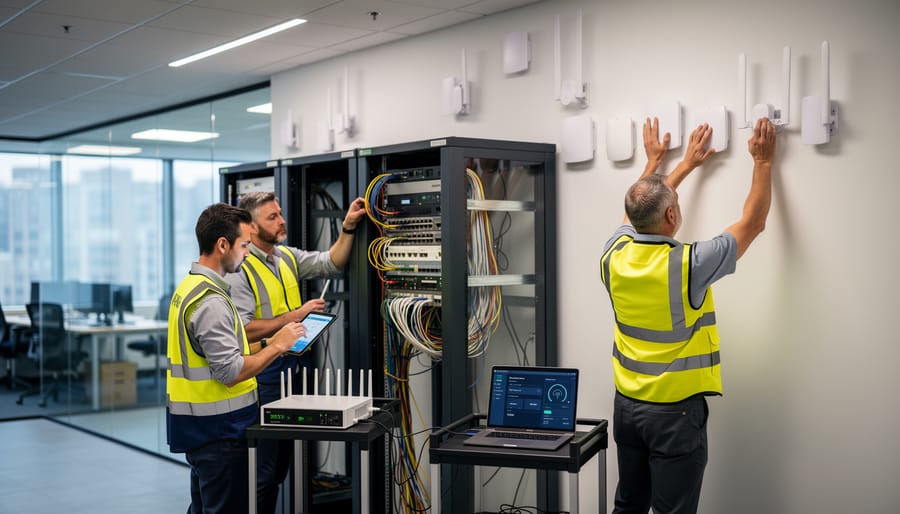
Before you begin migrating to 5G, you’ll need specific hardware, software, and partnerships in place to ensure a smooth transition. A successful integration depends on having the right equipment, confirming carrier availability, and establishing the internal resources to manage the changeover.
Hardware Requirements
Your primary hardware investment centers on 5G-compatible network equipment. You’ll need a 5G business router or gateway that supports the frequency bands your chosen carrier uses, typically Sub-6 GHz or mmWave, depending on your location. Enterprise-grade 5G routers range from $500 to $3,000 and should include failover capabilities to maintain your 4G connection during the transition.
Network switches may require upgrades if your current infrastructure can’t handle the increased throughput 5G delivers. Look for managed switches with at least 10Gbps uplink ports to avoid creating bottlenecks. You’ll also need 5G-compatible antennas if your building has signal penetration issues; external antennas can significantly improve reception in urban environments with dense construction.
Don’t overlook cabling infrastructure. While Cat5e might suffice for basic 4G speeds, Cat6 or Cat6a cabling ensures you can fully utilize 5G’s multi-gigabit potential without physical layer constraints.
Carrier Selection and Coverage Verification
Before purchasing equipment, verify 5G coverage at your specific location. Request site surveys from multiple carriers, don’t rely on coverage maps alone, as 5G signal strength varies dramatically between street level and upper floors. Test actual speeds during business hours when network congestion is highest.
Compare business plans from at least three carriers, examining service level agreements, uptime guarantees, and bandwidth caps. Building global business alliances with reliable carriers ensures you receive priority support and favorable contract terms.
Software and Internal Resources
Plan for firmware updates across your network infrastructure and endpoint security software that recognizes 5G as a trusted connection. You’ll need network monitoring tools that can track both 4G and 5G performance metrics simultaneously during the hybrid phase.
Allocate internal IT staff time for planning, testing, and implementation, expect 40-60 hours for a typical small business deployment. If your team lacks 5G integration experience, partnering with specialists who provide 24/7 support throughout the migration reduces downtime risk and accelerates deployment.
Critical Warnings and Compatibility Considerations

Before you begin your 5G integration, understand that this transition introduces several critical risks that can disrupt operations, expose security gaps, or create legal complications. Many businesses underestimate these challenges and face avoidable downtime.
Service disruptions are nearly inevitable without proper planning. Unlike a simple router swap, 5G integration touches every connected system in your organization. Your VoIP phones, security cameras, payment terminals, and cloud applications all depend on continuous connectivity. A poorly executed cutover can leave your business offline for hours or days. Always maintain your existing 4G services as a hot standby until you’ve verified 5G stability under real-world conditions. This parallel operation costs more short-term but prevents catastrophic revenue loss.
Legacy equipment presents the second major hurdle. Not all hardware supports 5G frequencies or protocols, even if it’s “new enough” to work with modern 4G services. Older routers, network switches, and security appliances may lack the processing power for 5G throughput or the firmware updates required for compatibility. Budget for potential hardware replacements beyond just the 5G router itself, and test each critical system before full deployment.
Security vulnerabilities multiply during transition periods. You’re temporarily running dual networks with different security profiles, creating potential gaps in your firewall rules, VPN configurations, and access controls. Attackers specifically target organizations during infrastructure changes. Implement strict security protocols from day one, including network segmentation to isolate the 5G integration zone from production systems.
Contractual obligations with your current 4G provider require careful attention. Most business internet contracts include early termination fees, minimum service periods, or specific cancellation notice requirements. Review your agreement thoroughly before making changes. Some providers offer migration paths that waive penalties if you’re upgrading to their 5G services, but these deals require negotiation.
Regulatory compliance adds another layer of complexity. Organizations in healthcare, finance, or government sectors face strict data handling requirements. Your 5G network must meet the same compliance standards as your 4G infrastructure, including lawful interception obligations and data residency rules. Working with integration specialists who choose the right solution for your specific compliance needs prevents costly violations.
Step-by-Step 5G Integration Process
Step 1: Conduct a 5G Readiness Assessment
Before committing resources to a 5G migration, you need to verify that 5G broadband will actually deliver superior performance at your business location. Start by checking carrier coverage maps for your address, but don’t rely on these alone since real-world signal strength varies significantly based on building materials, surrounding structures, and distance from cell towers.
Request site surveys from multiple 5G carriers. These on-site assessments measure actual signal strength in decibels (dBm), typically ranging from -50 dBm (excellent) to -120 dBm (unusable). You’re looking for readings between -50 and -85 dBm for reliable 5G service. Test at different times of day and in various locations throughout your facility, particularly in areas where critical systems operate.
Compare carrier offerings on more than just price. Evaluate network slicing capabilities, service level agreements, guaranteed bandwidth versus shared bandwidth, and failover provisions. A systems integration partner can conduct this technical analysis objectively, testing latency under load, measuring actual throughput against your current 4G baseline, and identifying whether the carriers’ 5G infrastructure can handle your specific application requirements. This professional assessment prevents costly migrations to networks that won’t meet your operational needs.
Step 2: Design Your Hybrid 4G/5G Network Architecture
With your readiness assessment complete, the next critical step is architecting a hybrid network that leverages both 4G and 5G simultaneously. This dual-connectivity approach prevents the all-or-nothing risk of an immediate cutover while allowing you to capitalize on 5G advantages where they matter most.
Start by segmenting your network based on application criticality and performance requirements. Identify which systems demand the lowest latency and highest throughput, cloud-based collaboration tools, video conferencing platforms, or real-time data analytics typically benefit most from immediate 5G migration. Less time-sensitive applications like email, file storage, and basic web browsing can remain on 4G initially.
Document which departments will transition first. IT and a small pilot group make ideal candidates for initial 5G deployment, providing real-world testing before broader rollout. Map out your load balancing strategy: will 5G handle primary traffic with 4G as automatic failover, or will you split traffic types between networks? This decision affects router configuration and determines your redundancy level.
Create a detailed network diagram showing how 5G and 4G connections will coexist, which VLANs will route through each connection, and failover triggers. This blueprint guides your hardware installation and configuration steps while ensuring business continuity throughout the transition.
Step 3: Upgrade Hardware and Infrastructure
Upgrading to 5G-capable hardware forms the physical foundation of your migration. Start by installing a 5G modem or gateway that supports the specific frequency bands your chosen carrier uses, not all 5G equipment works with all providers. Position this equipment where you verified the strongest signal during your readiness assessment, which may differ from your current 4G setup location.
Replace your primary router with a 5G-compatible model that handles the increased bandwidth without becoming a bottleneck. For businesses with multiple departments or floors, upgrade network switches to those supporting at least 2.5Gbps ports. Older gigabit switches will limit your ability to fully utilize 5G speeds.
Evaluate your structured cabling infrastructure. Cat5e cabling may suffice for basic 5G speeds, but Cat6 or Cat6a provides future-proofing and supports the full throughput 5G can deliver. Run new cables where existing infrastructure creates limitations, particularly for high-priority areas or data-intensive departments.
Connect your new 5G gateway to your network infrastructure gradually. Configure it initially as a secondary connection alongside your existing 4G system. This parallel operation lets you test performance and troubleshoot issues without risking your primary connectivity.
Document every hardware change, including equipment serial numbers, installation locations, and configuration settings. This inventory proves essential during troubleshooting and when working with support teams.
Step 4: Configure Network Settings and Security Protocols
Once your 5G hardware is in place, proper network configuration separates a successful deployment from a security liability. Start by establishing your IP addressing scheme, if you’re running dual 4G/5G connectivity, create separate IP subnets for each network to maintain clear traffic segmentation and simplify troubleshooting.
Configure VLANs to isolate critical systems from general traffic. Assign your 5G network a dedicated VLAN, then route specific departments or application types accordingly. This segmentation limits exposure if one network segment is compromised and gives you granular control over which services use which connection.
Update firewall rules to account for 5G’s different traffic patterns and potentially higher throughput. Enable stateful packet inspection, block unnecessary ports, and create explicit allow rules rather than permissive defaults. If you’re using VPNs for remote access or site-to-site connectivity, reconfigure tunnel endpoints to support both networks during the transition period, then adjust encryption protocols to match 5G’s capabilities.
Implement network access control to verify device identity before granting 5G connectivity. Enable WPA3 encryption on wireless access points and require certificate-based authentication for sensitive systems. Document every configuration change, you’ll need this record when optimizing performance or troubleshooting later.
Step 5: Migrate Services and Applications
Begin with the least critical applications to minimize risk if issues arise. Migrate non-essential cloud services first, file storage, productivity tools, and internal collaboration platforms make ideal candidates for initial testing. Configure each application to connect through your 5G network, then verify functionality with a small user group before expanding access.
Next, move high-priority systems like telephony, VoIP, and customer-facing applications. Test call quality, latency, and reliability under realistic load conditions. Run parallel operations on both 4G and 5G networks for 48-72 hours, comparing performance metrics to ensure the 5G connection meets or exceeds your baseline standards.
For mission-critical systems, payment processing, inventory management, or real-time communications, adopt a personalized integration approach that considers your specific workflows and risk tolerance. Keep these services on 4G until you’ve verified stable 5G performance across all other operations.
Maintain active 4G connectivity throughout this phase as your failover option. Configure automatic failback rules so that if 5G performance degrades, traffic automatically reroutes to 4G without manual intervention. Document which services have migrated, their performance benchmarks, and any configuration adjustments made during testing.
Step 6: Monitor Performance and Optimize
Once your 5G network is live, systematic performance monitoring ensures you’re actually achieving the improvements that justified the migration. Deploy network monitoring tools that track key metrics including latency, jitter, packet loss, and throughput across different times of day. Compare these measurements directly against your 4G baseline from the readiness assessment, you should see latency reductions of 50% or more and throughput increases of at least 200-300% in optimal conditions. If numbers fall short, investigate potential bottlenecks such as outdated network switches creating choke points, DNS server configuration slowing resolution times, or Quality of Service (QoS) settings prioritizing the wrong traffic types.
Configure alerts for performance degradation so your IT team knows immediately when metrics drop below acceptable thresholds. Set bandwidth usage alerts at 70% and 85% capacity to prevent saturation, and establish latency warnings if response times exceed 30ms on critical applications. Test under realistic load conditions by having multiple departments use bandwidth-intensive applications simultaneously, then analyze the results to identify which services need additional optimization.
This monitoring phase benefits tremendously from 24/7 support, performance issues don’t respect business hours, and having expert assistance available when problems emerge prevents small configuration issues from becoming business disruptions. Fine-tune your network iteratively based on real usage data: adjust QoS priorities, rebalance traffic across network segments, and optimize antenna placement if signal strength varies across your facility. Document what settings produce the best results for your specific environment, creating a performance baseline that simplifies future troubleshooting.

Verifying Your 5G Integration Success
Confirming that your 5G integration delivers the promised benefits requires systematic testing against specific benchmarks. Start by measuring throughput during typical business hours, you should see download speeds of at least 100-300 Mbps for standard business operations, with peak capabilities reaching 1 Gbps or higher depending on your carrier and plan. Compare these figures against your 4G baseline to quantify the improvement.
Latency measurements matter more than raw speed for many applications. Test ping times to your cloud services, VoIP systems, and critical business applications. Properly configured 5G networks should achieve latency between 10-30ms, substantially lower than typical 4G latency of 30-50ms. If you’re seeing latency above 40ms consistently, investigate signal strength issues or network congestion.
Reliability testing requires monitoring uptime over at least two weeks. Track connection drops, service interruptions, and periods of degraded performance. Your 5G system should maintain 99.5% uptime as a minimum threshold, anything lower suggests coverage gaps or configuration problems that need addressing before you retire 4G services.
Conduct structured user acceptance testing across departments. Have representatives from different teams verify that their specific applications perform acceptably. Document their feedback on video conferencing quality, file transfer speeds, and any application-specific concerns. You need approval from at least 90% of test users before proceeding.
Only decommission your 4G services after the 5G network has operated flawlessly for 30 days minimum, all performance benchmarks are consistently met, and you’ve documented the new baseline configuration. Maintain your 4G contract month-to-month for an additional 90 days as insurance. Ongoing maintenance should include weekly performance reviews, quarterly coverage assessments, and immediate investigation of any performance degradation exceeding 15%.
Common Questions About 4G to 5G Migration
Can we keep 4G as a permanent backup connection?
Yes, maintaining 4G as a failover connection is a recommended best practice for business continuity. Many organizations configure automatic failover so that if 5G signal degrades or service interruptions occur, traffic seamlessly switches to the 4G network until primary service restores.
How long does a typical 4G to 5G integration take?
The timeline varies based on network complexity and organizational size, but most businesses complete the transition in 4-12 weeks. Smaller deployments with straightforward requirements can finish in under a month, while enterprises with multiple locations and legacy systems may need three months or more for a phased rollout.
What happens if our location has weak 5G signal strength?
Weak signal areas may require additional infrastructure such as external antennas, signal boosters, or repeaters to achieve reliable performance. If coverage remains insufficient after enhancements, maintaining 4G as the primary connection with targeted 5G deployment for specific high-bandwidth applications may be the practical solution.
Do all our devices and equipment need replacement for 5G?
Not necessarily. Core network equipment like routers and modems will need 5G capability, but most end-user devices and computers connect through your local network and won’t require changes. Legacy equipment that relies on specific 4G features may need assessment for compatibility or potential upgrades.
What does professional 5G integration typically cost?
Costs depend on scope, location count, and existing infrastructure condition. Budget for hardware upgrades, installation services, configuration work, and potential infrastructure improvements. Working with an integration partner provides upfront cost transparency and helps avoid unexpected expenses from compatibility issues or inadequate planning.
What kind of ongoing support is necessary after migration?
Post-migration support should include network monitoring, performance optimization, security updates, and troubleshooting assistance. Having access to 24/7 technical support proves valuable during the initial stabilization period and for addressing any service degradation or configuration adjustments as your business needs evolve.
Beyond these common questions, businesses often wonder about carrier contract implications. If you’re locked into a multi-year 4G service agreement, contact your provider to discuss migration options. Many carriers offer transition programs that credit existing contracts toward 5G plans or provide early termination accommodations for customers upgrading to their 5G services.
Another frequent concern involves employee training and change management. While the technical migration happens behind the scenes, prepare your team for potential differences in connection behavior, new backup procedures if 4G remains available, and updated protocols for reporting connectivity issues. Clear communication about the timeline and expected benefits helps minimize disruption.
Consider the warranty and support implications for new equipment. Ensure that any 5G hardware comes with adequate warranty coverage and that your integration partner provides documentation for all configuration changes. This documentation becomes essential for future troubleshooting and when onboarding additional IT staff.
Migrating from 4G to 5G broadband isn’t something you tackle overnight. As we’ve outlined, it requires thorough assessment of your current infrastructure, careful hardware selection, strategic network design, and methodical implementation. Rushing this process or skipping steps creates vulnerabilities that can disrupt operations and compromise security.
The phased approach we’ve detailed, maintaining 4G as a failover while systematically migrating services, gives you the safety net businesses need during major infrastructure changes. You’re not gambling with connectivity. You’re building a resilient system that leverages 5G’s performance advantages while protecting against potential issues.
That said, most organizations benefit significantly from expert guidance during this transition. Stream It’s 5G Broadband Systems Integration Services address the specific challenges your business faces, whether you’re a small office upgrading a single location or a multi-site enterprise coordinating complex infrastructure changes. We don’t offer cookie-cutter solutions because no two businesses have identical network requirements, usage patterns, or risk tolerances.
Our team handles everything from initial 5G readiness assessments through final verification and beyond. Perhaps most importantly, we provide 24/7 support throughout the entire integration process and afterward. When you’re migrating critical business systems, having experts available around the clock isn’t a luxury, it’s essential.
Ready to start your 4G-to-5G transition? Schedule a consultation with Stream It to discuss your specific integration needs and develop a customized migration plan that keeps your business connected.